
TalentPass
Build and share rich talent profiles
TalentPass, developed by Gobekli, helps individuals create dynamic, AI-powered profiles that bring together skills, achievements, credentials and experience in one place. Rather than relying on a traditional résumé, TalentPass enables people to build tailored profiles for different opportunities, highlighting the capabilities and experiences most relevant to a particular audience or context.
Designed to make talent more visible, TalentPass combines verifiable credentials, skills data and personal achievements into rich digital narratives that can be shared across education, employment and professional networks. Its approach is grounded in the belief that technology should amplify human potential and help individuals take control of their own story.
Find out more: TalentPass by Gobekli


Activity: Transform your resume
What if your résumé could become a dynamic, personalised talent profile?
In this activity, you'll explore TalentPass and discover how Pythia, their AI assistant can help transform your experience, education, skills and achievements into a rich digital profile. Using Pythia, you'll create a profile, upload your résumé and see how your capabilities can be presented in a more engaging, skills-focused way.
Whether you choose to build a complete profile or simply explore the platform, you'll gain insight into how AI-powered talent profiles and digital credentials can work together to make skills and achievements more visible.
Activity Snapshot
Estimated Time: 15–30 minutes
What You'll Do: Create a TalentPass profile and use AI to transform your experience, skills and achievements into a dynamic digital profile.
Who's It For?: Anyone interested in showcasing their skills, experience and credentials in a more personalised and engaging way.
What You'll Need: A résumé, CV or summary of your experience and education.
What You'll Get: A TalentPass profile, experience working with an AI talent assistant, and insight into how digital profiles and credentials can support career opportunities.


Step by step instructions
Step 1. Set up a TalentPass account
Go to TalentPass
Click “Sign up” and sign up with your Google account or email and password (you may need to verify your email before you can log in)
Step 2: Build your profile
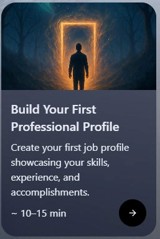
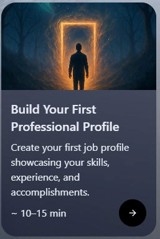
Select Build Your First Professional Profile
Click on Begin Conversation to start your guided conversation with Pythia, she’ll tell you a little about what she will do and then asks if you want to build your profile or take a tour.
Select [I’d like to build my profile] and follow the prompts and you’ll be asked to upload a resume or use your LinkedIn profile.
After your profile is built, you can edit, refine, and make another profile in the Profiles section.
Need Support?
If you have questions, encounter technical issues, or would like help completing an activity, we're here to help.
Email us at badgesandpit@lifelonglearningpractice.com and we'll do our best to assist you or connect you with the activity provider.
Share Your Achievement
Completed the activity? We'd love to see what you discovered.
Share your badge, skills profile, wallet, insights or reflections on LinkedIn and help others explore the world of digital credentials and skills recognition.
Use #BadgeSandpit in your post so the community can follow your journey and discover new ideas, tools and opportunities.