
LinkedCreds
Showcase the skills that define you.
LinkedCreds is an open-source platform that helps individuals and organisations create, verify and share skills, achievements and experiences as Verifiable Credentials. Developed through the work of the U.S. Chamber of Commerce Foundation's T3 Innovation Network, LinkedCreds was designed to make digital credentials more accessible, portable and learner-controlled.
Unlike traditional résumés, LinkedCreds enables people to attach evidence to their skills, request recommendations, and share verifiable claims that can be independently validated. It supports self-issued, peer-issued and organisation-issued credentials, giving learners and workers greater control over how they document and communicate their capabilities.
Built around principles of transparency, portability and consent, LinkedCreds helps make skills more visible and trustworthy across education, employment and community settings.
Find out more: LinkedCreds


Activity: Claim a skill
What if your résumé could do more than list jobs? What if it could provide verifiable evidence of your skills, experiences and achievements?
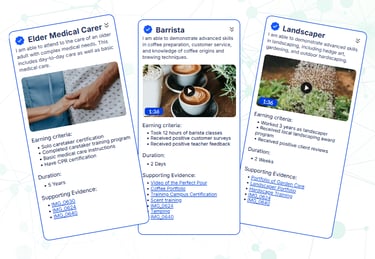
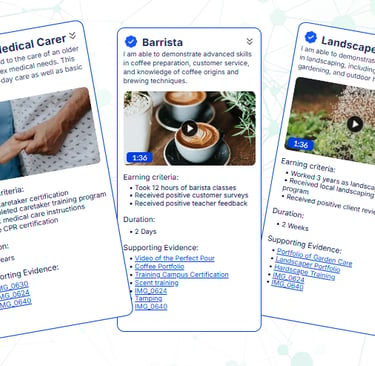
In this activity, you'll explore LinkedCreds, an open-source platform that helps individuals create, verify and share skills gained through work, volunteering, study and life experiences. You'll create a verifiable skill claim based on a real experience, add supporting evidence, and publish a shareable profile that demonstrates what you can do.
Activity Snapshot
Estimated Time: 15–30 minutes
What You'll Do: Create and publish a verifiable skill claim based on a real experience.
Who's It For?: Anyone interested in showcasing skills gained through work, volunteering, study or life experiences.
What You'll Need: A Google account and an experience you'd like to document. You can still explore without a Google account but you won’t be able to save
What You'll Get: A shareable, verifiable skill claim and hands-on experience with verifiable credentials.
Step by step instructions
Step 1. Create an Account
Visit LinkedCreds and sign in with your Google account. If you just want to explore and not create an account, skip this and you can preview and take a screenshot of your claim but you won't be able to publish or share the actual claim.
Step 2. Create a Skill Claim
Choose a skill or experience you would like to showcase and add a title and description.
You can also upload a document, image, link or other evidence to support your claim. As you add in your Skills Description, the app will suggest some approprate skills, you can choose whether or not to add these to your claim
When you finish the steps to build your claim, you have the option to [Finish & Sign].
Note:this will only work if you have logged in with your Google Drive. If you just want to experience building the credential you can take a screen shot at this point and you don't need to save.
Step 3. Publish Your Claim (Optional)
Review your information and publish your skill claim.
Step 4. Request a Recommendation (Optional)
Invite someone to validate or recommend your skill.
Step 5. Share Your Achievement
Copy the link to your published claim and share it in the Badge Sandpit or on LinkedIn using #BadgeSandpit.
Need Support?
If you have questions, encounter technical issues, or would like help completing an activity, we're here to help.
Email us at badgesandpit@lifelonglearningpractice.com and we'll do our best to assist you or connect you with the activity provider.
Share Your Achievement
Completed the activity? We'd love to see what you discovered.
Share your badge, skills profile, wallet, insights or reflections on LinkedIn and help others explore the world of digital credentials and skills recognition.
Use #BadgeSandpit in your post so the community can follow your journey and discover new ideas, tools and opportunities.